
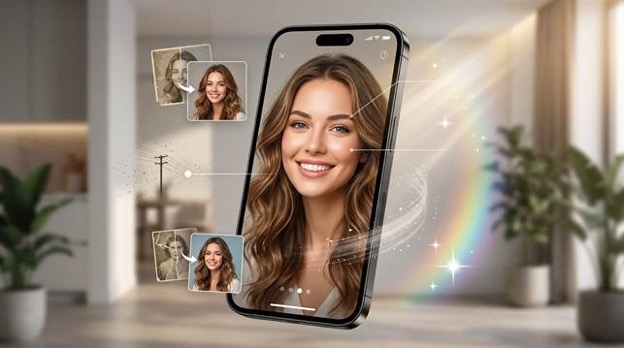

If you have ever felt that one photo app is good at fixing portraits, another is better for old photos, and a third one is needed for cleanup, you already know the problem Wondershare Relumi is trying to solve. Many people do not want a stack of separate tools. You want one app that can help when a portrait almost works, when an old memory looks damaged, when a photo feels too blurry, or when the background ruins an otherwise good shot.
That is why Relumi matters. The real question is whether an app can edit photos in a way that feels useful, simple, and trustworthy on a phone. Wondershare Relumi tries to position itself as that all in one answer.
Part 1. What makes an AI photo editor app actually useful in daily life
A lot of apps promise big results, but the most useful ones solve everyday frustration. Maybe a portrait is almost perfect except for a blink. Maybe your family scan looks faded and scratched. Maybe the best travel photo has strangers in the background. Maybe an old phone image is too soft to share confidently. These are common problems, and they are emotional problems as much as technical ones.
You do not always need a dramatic edit. Often you just want the photo to feel right again. That is why a good AI photo editor app should remove friction instead of adding it. It should help you fix the issue quickly, preserve the mood of the image, and keep the result believable.
Part 2. Why Wondershare Relumi stands out as a best photo app for 2026
When you look at Wondershare Relumi as a whole, the main strength is range. The app is not locked into one narrow task. It brings together portrait rescue, old photo recovery, object cleanup, quality enhancement, and creative animation in one mobile experience.
That is a major reason it can be discussed as a best photo app for 2026. Not because it tries to do everything in an abstract way, but because the features map closely to the problems people really run into when they look back at their photos.
It also fits the label AI photo editor app in a practical sense. The app is built around letting AI handle correction work that would otherwise take more time, more attention, or more editing knowledge than most mobile users want to spend.
Why this feels stronger than a single purpose tool
The biggest appeal is that you can stay inside one mobile workflow. If one image needs a portrait fix, another needs more clarity, and another needs a distracting object removed, you are still working in the same app. That makes the experience feel lighter for everyday use.
Part 3. The features that make the app easy to recommend
AI Retake is one of the clearest reasons the app feels practical. Some photos are good enough to matter but not clean enough to keep. A blink, an awkward expression, or a slight blur can turn a meaningful picture into one you almost delete. AI Retake is built around that exact feeling. It gives you a way to rescue the shot instead of living with the disappointment.
The app also goes beyond portraits. Old photo restoration and colorization help when family memories are damaged by age, stains, scratches, or fading. Smart object removal helps when a background detail keeps stealing attention. Quality enhancement helps when a photo is low resolution or softer than you expected.
What makes these features feel relevant is not just variety. It is the way they connect to real situations. You can move from fixing a face to restoring a memory to cleaning up a scene without switching mindsets. That is a strong reason many users could see Wondershare Relumi as a best photo app rather than just another novelty editor.
Part 4. How to use AI Retake on mobile when a photo almost works
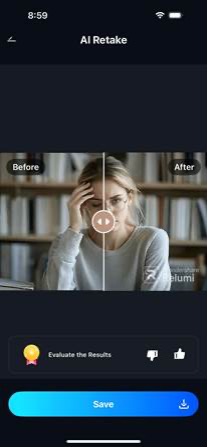
One of the most relatable reasons to open the app is when the photo is close to right but still not good enough to share. The official iPhone guide for AI Retake shows a simple mobile flow that matches how many people actually edit. You open the tool, choose the portrait, let the app process the change, and review the result before saving it.
Step 1. Open AI Retake when a good photo needs one more chance
This is a helpful place to start when you already like the moment but the photo still feels slightly off. Maybe the eyes are closed, the smile feels awkward, or the face just does not look as good as the moment felt in real life.
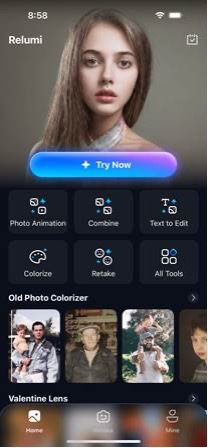
Step 2. Pick the portrait you want to rescue
You can focus on the one shot that matters instead of giving up on it. This is useful because many photos are almost right. The expression, light, or timing may still be worth saving if the app can clean up the problem quickly.
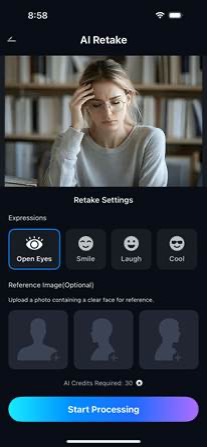
Step 3. Let the app process the retake result
This is where the app tries to fix what the camera captured badly without making the person look artificial. For many users, speed matters here because you want a usable result without doing careful manual edits on a phone screen.
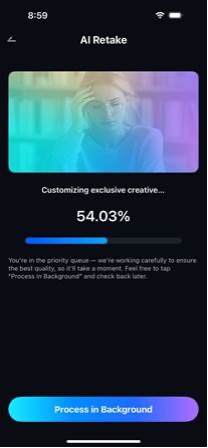
Step 4. Review the final portrait and save the better version
A strong result should still feel like your real photo. The goal is not to create a different face. The goal is to keep the memory, fix the distraction, and help the image feel closer to how you remember the moment.
Part 5. Where the app brings the most emotional value
The strongest apps are not only about filters or effects. They protect photos you care about. If you have ever looked at a good portrait and felt annoyed that one tiny flaw ruined it, you understand why AI Retake matters. If you have ever held an old family photo and worried that the detail may disappear over time, you understand why restoration matters. If you have ever loved a travel photo but hated the clutter in the background, you understand why cleanup matters.
This is where Wondershare Relumi feels more human than many editing apps. The promise is not just that your images look cleaner. The app helps the photo feel usable again, which matters because most editing starts with a photo that means something to you.
Quick comparison: what people really want from a photo app
| What you need | Why it matters | How Relumi helps |
| Fix a missed expression | A strong moment can feel wasted | AI Retake helps rescue the shot |
| Improve a blurry or soft photo | Detail loss makes portraits weaker | Quality enhancement sharpens and cleans the image |
| Restore an old memory | Damage and fading can hide family history | Restoration and color tools bring detail back |
| Clean a distracting background | Clutter pulls attention away | Object removal makes the frame feel calmer |
If you judge the app by that standard, its appeal is easy to understand. You want convenience, speed, realism, and one app that can handle more than one kind of problem.
Conclusion
Wondershare Relumi makes a strong case for itself in 2026 because it is built around the kinds of photo problems people actually face. You can fix portraits, sharpen weak images, restore old memories, clean distractions, and add creative motion in one mobile space. That combination gives the app real everyday value.
If you are comparing options and want a tool that feels broad, practical, and easy to understand, this app is worth a serious look. It supports the idea of an all in one AI photo editor app, and it does enough across different photo problems to justify the label best photo app for many everyday users.

